

BLP → CG4 · Windows

Convert BLP to CG4

BLP to CG4 converter that respects your privacy. No cloud uploads, no file size limits, just fast offline batch processing.

Got a folder full of BLP files? reaConverter batch converts them to CG4 in minutes, not hours. Local processing means instant results, even with thousands of files.

.blp.CG4
4.8

Converting files since 2001

Runs offline — nothing uploaded

Read what our users say →

How to Convert Multiple .blp Images to .cg4?

1. Download and Install reaConverter

reaConverter is a standalone Windows app — download, install, and start converting BLP files in under two minutes. Apply image edits like resize, crop, or color adjustment while converting.

2. Load your BLP files

Add your BLP files to reaConverter. Whether it's a handful or an entire archive, the batch engine processes them efficiently.

Browse for files, drag them in, or add entire folders at once. reaConverter queues everything automatically.

Load your BLP files into reaConverter

3. Select CG4 as output format

Pick CG4 as the output format. Set the destination folder and optionally configure resolution, quality, or file naming.
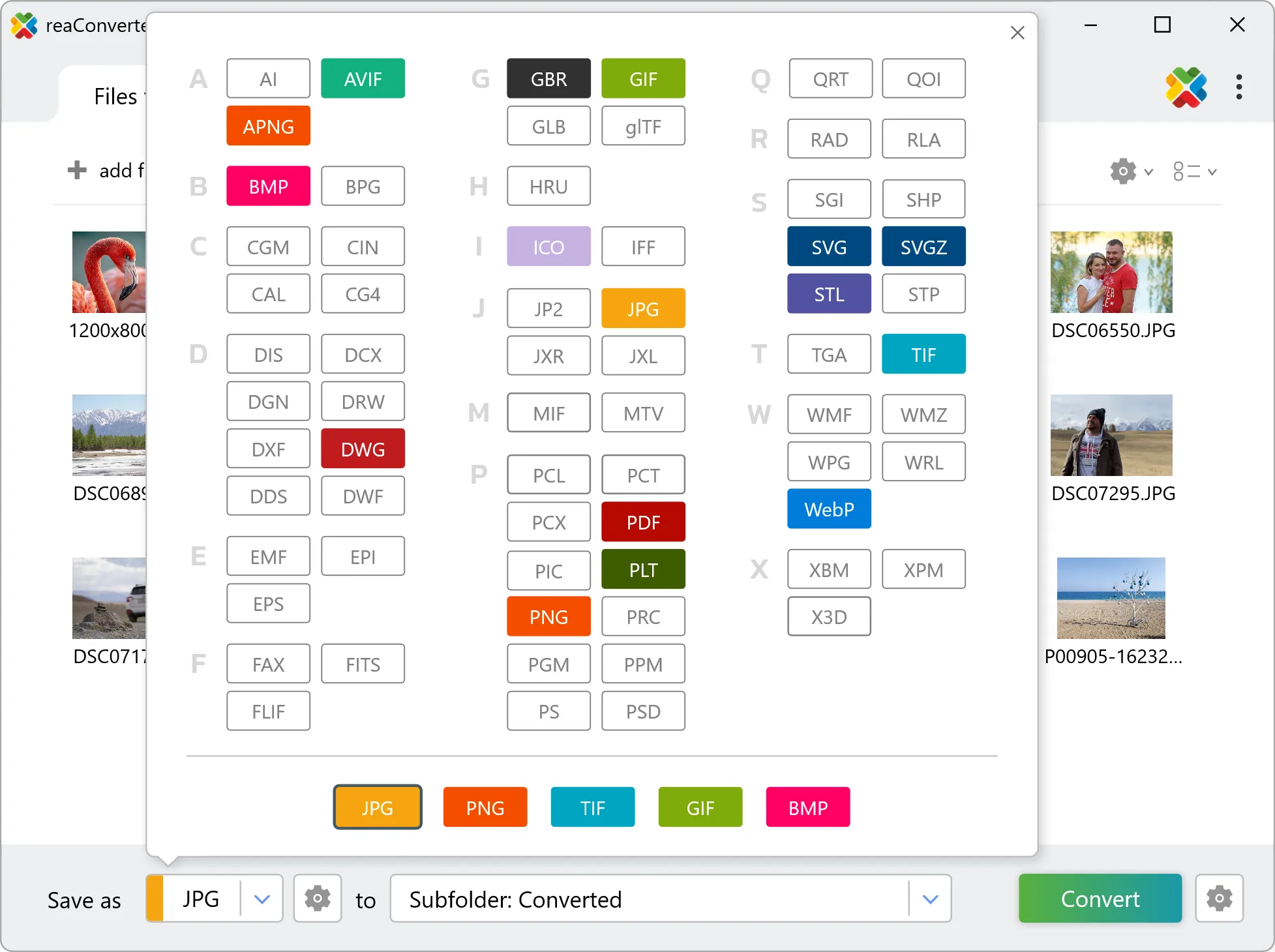
Select CG4 as output format

4. Start BLP to CG4 conversion

Start the conversion with one click. reaConverter handles everything and notifies you when it's done.

Start Conversion

When the batch finishes, your CG4 files are ready in the destination folder you chose earlier.

Step by step

How It Works

reaConverter offers the fastest, simplest solution for converting your BLP files into CG4 in seconds - all images processed on your PC for maximum privacy and speed.

Power Features

Do more with your images

Converting BLP images for use in a larger project? With reaConverter, you can convert, edit, and enhance your images in one streamlined process.

Our range of editing options includes such image processing actions as Resize, Rotate, Crop, Color Replace, Watermarks and more. Adjust actions include RGB, HLS, HSV, Brightness and Contrast. Auto-processing options are also available, such as auto-rotate and auto-crop.

Image editing

User reviews

What people say after the first batch

Average User Rating:4.8
Last updated on November 02, 2026
reaConverter saved our team hundreds of hours by digitizing decades of CG4 archives in weeks—not months. Its resolution scaling preserved every detail, even in files older than some team members!
Anna K.
Anna K.
Satisfied Customer
Finally an app that actually opens my weird files! Saves me from format frustration daily.
Kyle Brooks
Kyle Brooks
Happy User
This converter delivers exceptionally quick format conversions with reliable results every time.
Brian White
Brian White
Happy User
Security was our top concern when evaluating file conversion tools. reaConverter’s offline mode and role-based access controls let us lock it down for sensitive environments. No unexpected network calls or bloat — just clean, fast conversions. Even passed our pen-testing scans without a hitch.
Marcus White
Marcus White
Healthcare IT
An excellent program! I use it regularly in my work - it supports nearly every file format imaginable. The interface is intuitive and runs flawlessly every time.
Roger Cook
Roger Cook
Happy User
For agencies handling confidential data, reaConverter eliminates cloud-upload risks while delivering unmatched conversion reliability. Our team uses it both in-office and remotely with identical results.
Jamal Bailey
Jamal Bailey
Satisfied Customer

FAQ

BLP to CG4 Conversion

Can reaConverter convert BLP to CG4?

Yes! reaConverter instantly converts .blp to .cg4 with perfect quality preservation. With its batch processing feature, you can convert multiple files at once in just a few clicks. You can even convert BLP images directly from Windows Explorer using the right-click menu — fast and convenient.

What is reaConverter used for?

reaConverter is a software program used for converting images and other types of files from one format to another. It supports a wide range of file formats and allows users to convert multiple files at once, making it a valuable tool for graphic designers, photographers, and other professionals who work with digital images. reaConverter also includes features for resizing, cropping, and editing images, along with batch processing capabilities that help automate repetitive tasks.

Can I convert BLP to CG4 online?

If you only need to convert a few BLP files to CG4 format, feel free to try our free online free online BLP to CG4 converter — perfect for small batches with no installation needed!

How can I turn BLP files into CG4 on my computer?

The best way to change BLPs to CG4s on your PC is to install a quality piece of software, such as reaConverter. This software is extremely efficient in managing a wide range of batch files conversions, including conversion from BLP to CG4.

How can I automate BLP to CG4 files conversion?

reaConverter supports all the most useful automation features such as right-click сonversion and Watch Folders for the most efficient automated files conversion in any software of this type.

Is there a way to convert BLP files to CG4 using the command prompt?

reaConverter provides full access to all its features via Windows command line, including a high-performance command-line blp to cg4 converter for batch processing.

What else can I do with reaConverter?

Convert vector filesChange image DPIConvert RAW photo formatsTrace images to vectorSet image bit depth

Related conversions

Other ways to convert BLP files, and other sources that convert to CG4.

Discover More

Beyond format conversion

Batch conversion, editing, and processing across 800+ formats, from RAW and HEIC to DICOM, DWG, and PDF. Everything runs locally, with no cloud and no upload limits.

Free trial · Windows 10/11 · v8.0.262 · Files never leave your computer

reaConverter software