


Convert FLIF to PDF

FLIF to PDF made easy. reaConverter processes documents locally with options for layout, quality, and file naming.

Batch FLIF to PDF conversion doesn't have to be complicated. reaConverter processes entire folders with consistent quality settings. Works offline with no internet required — convert anywhere, anytime. Legal teams use it to process case files in bulk.

FLIFPDF

How to Convert Multiple FLIF Images to PDF?

1. Download and Install reaConverter

Download reaConverter and install it in seconds. The setup is straightforward — no complex configuration, no extra software required. Need edits? Resize, rotate, or add watermarks during conversion.

2. Load your FLIF files

Open reaConverter and import your .flif files. No file limits, no slowdowns. Add as many as you need.

Drag files into the window, use the Add Files button, or select entire folders.

Load your FLIF files into reaConverter

3. Select PDF as output format

Select PDF from the output format list and set your destination folder. You can also adjust quality and compression settings.
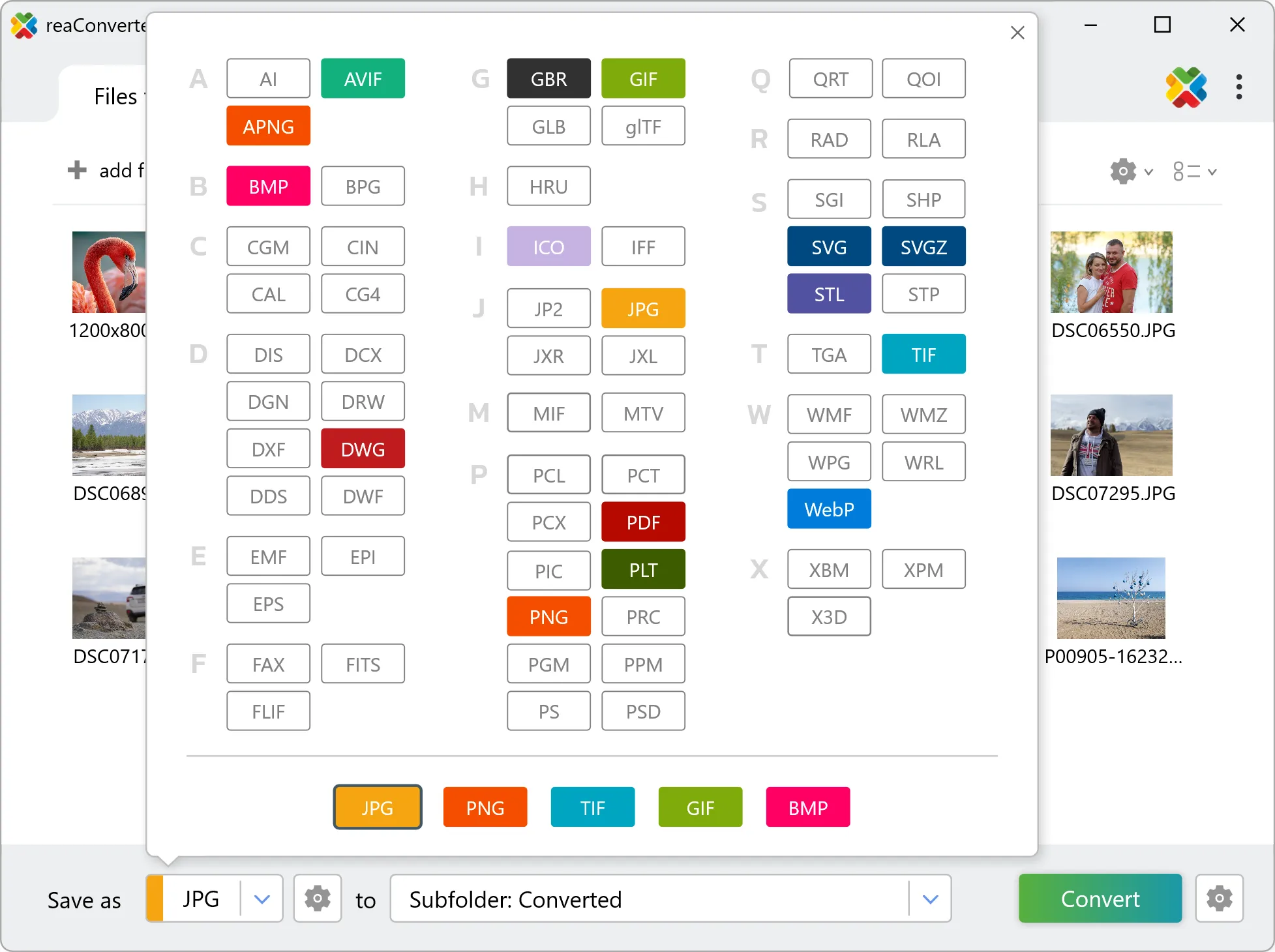
Select PDF as output format

4. Start FLIF to PDF conversion

Hit Convert to process your files. The log window shows progress, timing, and status for every file.

Start Conversion

Conversion complete? Your PDF files are saved to the destination folder, ready to use.

FLIF to PDF Converter

reaConverter offers the fastest, simplest solution for converting your FLIF files into PDF in seconds - all images processed on your PC for maximum privacy and speed.

Do more with your images

Converting FLIF images for use in a larger project? With reaConverter, you can convert, edit, and enhance your images in one streamlined process.

Our range of editing options includes such image processing actions as Resize, Rotate, Crop, Color Replace, Watermarks and more. Adjust actions include RGB, HLS, HSV, Brightness and Contrast. Auto-processing options are also available, such as auto-rotate and auto-crop.

Image editing

User Reviews

Average User Rating:
Last updated on January 25, 2026
"Convert PDFs instantly via right-click context menu — no need to open extra apps!"
Jessica M.
Jessica M.
Satisfied Customer
"PDF is certainly a universal format, but sometimes you need JPEG files instead. For conversion, I use reaConverter — a lightning-fast program. No online editor can match its speed. Install it once, and you're set. Just open, convert, and done!"
Nathan Ward
Nathan Ward
Satisfied Customer
"This converter actually keeps your PDF->JPEG files crisp! No more quality loss or frustrating lag. Why did I waste time with other tools?!"
Peter Cox
Peter Cox
Satisfied Customer
"I’ve tried dozens of converters, but reaConverter stands out. The OCR feature for scanned PDFs works flawlessly, and the software never crashes."
Emily K.
Emily K.
Satisfied Customer
"PDF → JPG in seconds online—so easy! 👏 Why complicate things with extra software?"
Zachary D.
Zachary D.
Satisfied Customer
"After testing numerous converters, this is the first solution that maintains 100% image quality during PDF to JPG conversion while operating seamlessly — no crashes or slowdowns even with batch processing."
Kenneth H.
Kenneth H.
Satisfied Customer

FLIF to PDF Conversion: FAQ

Can reaConverter convert FLIF to PDF?

Yes! reaConverter instantly converts .flif to .pdf with perfect quality preservation. With its batch processing feature, you can convert multiple files at once in just a few clicks. You can even convert images directly from Windows Explorer using the right-click menu — fast and convenient.

What is reaConverter used for?

reaConverter is a software program used for converting images and other types of files from one format to another. It supports a wide range of file formats and allows users to convert multiple files at once, making it a valuable tool for graphic designers, photographers, and other professionals who work with digital images. reaConverter also includes features for resizing, cropping, and editing images, along with batch processing capabilities that help automate repetitive tasks.

Can I convert FLIF to PDF online?

If you only need to convert a few FLIF files to PDF format, feel free to try our free online free online FLIF to PDF converter — perfect for small batches with no installation needed!

How can I turn FLIF files into PDF on my computer?

The best way to change FLIFs to PDFs on your PC is to install a quality piece of software, such as reaConverter. This software is extremely efficient in managing a wide range of batch files conversions, including conversion from FLIF to PDF.

How can I automate FLIF to PDF files conversion?

reaConverter supports all the most useful automation features such as right-click сonversion and Watch Folders for the most efficient automated files conversion in any software of this type.

Is there a way to convert FLIF files to PDF using the command prompt?

reaConverter provides full access to all its features via Windows command line, including a high-performance command-line flif to pdf converter for batch processing.

What else can I do with reaConverter?

Convert RAW formatsConvert GIS filesConvert DICOM imagesResize imagesConvert CAD formats

Find out more

Get advanced software for file conversion, processing, and editing, giving you complete, precise control over your work.
reaConverter software