

HIF → DWF · Windows

Convert HIF to DWF

HIF to DWF converter that respects your privacy. No cloud uploads, no file size limits, just fast offline batch processing.

Batch HIF to DWF conversion doesn't have to be complicated. reaConverter processes entire folders with consistent quality settings. Works offline with no internet required, so you can convert anywhere, anytime.

.hif.DWF
4.8

Converting files since 2001

Runs offline — nothing uploaded

Read what our users say →

How to Convert Multiple .hif Images to .dwf?

1. Download and Install reaConverter

First, grab reaConverter from the download button below. Installation is fast, and the software runs offline — no account or signup needed. Apply image edits like resize, crop, or color adjustment while converting.

2. Load your HIF files

Open reaConverter and import your .hif files. No file limits, no slowdowns. Add as many as you need.

Drag files into the window, use the Add Files button, or select entire folders.

Load your HIF files into reaConverter

3. Select DWF as output format

Select DWF as target format and pick where to save results. You can keep default settings or fine-tune the output.
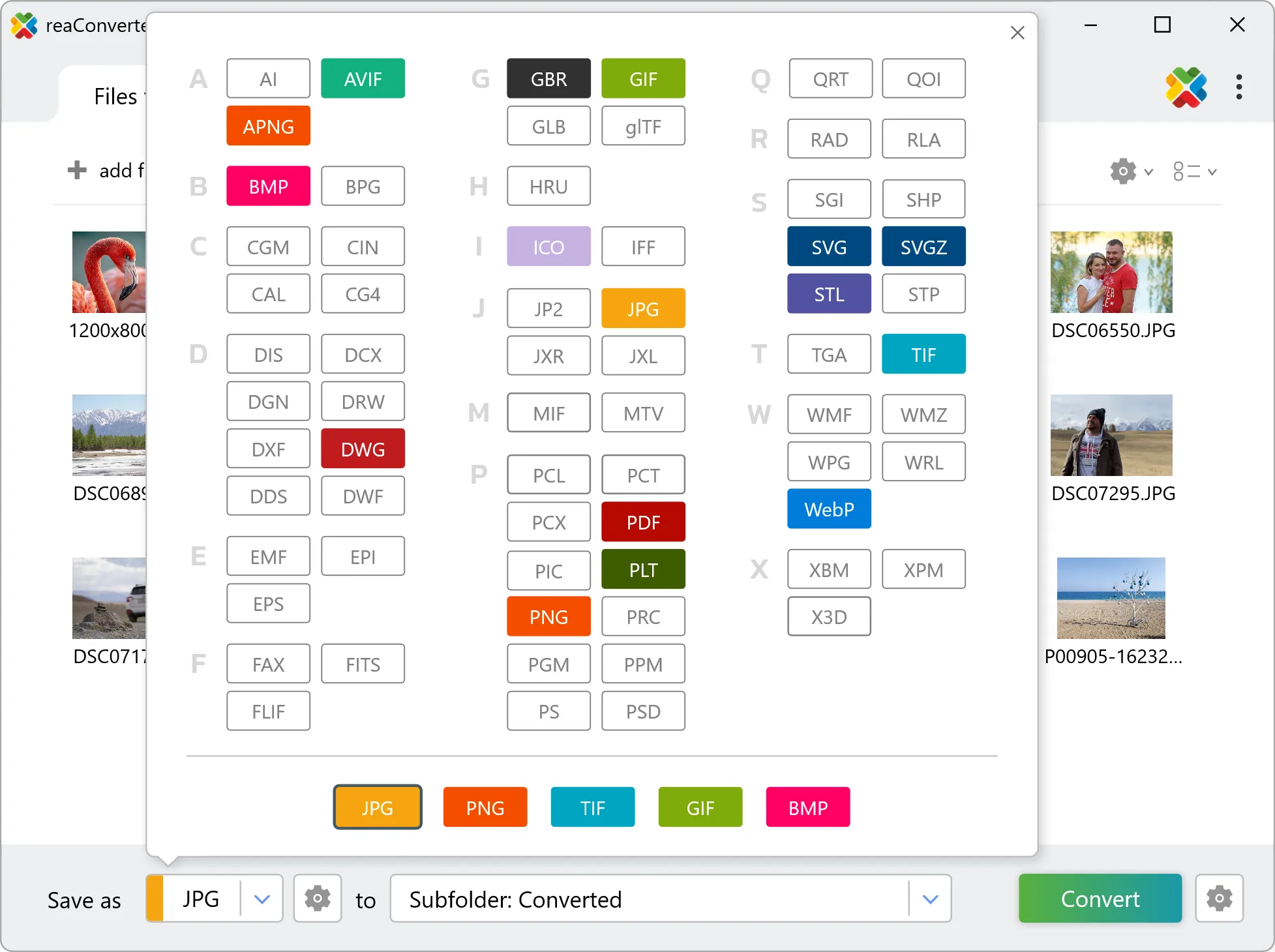
Select DWF as output format

4. Start HIF to DWF conversion

Hit Convert to process your files. The log window shows progress, timing, and status for every file.

Start Conversion

Conversion complete? Your DWF files are saved to the destination folder, ready to use.

Step by step

How It Works

reaConverter offers the fastest, simplest solution for converting your HIF files into DWF in seconds - all images processed on your PC for maximum privacy and speed.

Power Features

Do more with your images

Converting HIF images for use in a larger project? With reaConverter, you can convert, edit, and enhance your images in one streamlined process.

Our range of editing options includes such image processing actions as Resize, Rotate, Crop, Color Replace, Watermarks and more. Adjust actions include RGB, HLS, HSV, Brightness and Contrast. Auto-processing options are also available, such as auto-rotate and auto-crop.

Image editing

User reviews

What people say after the first batch

Average User Rating:4.8
Last updated on November 02, 2026
For architects/engineers working with DWF files, reaConverter offers enterprise-grade conversion with consumer-level simplicity. Outputs are optimized for cross-platform use without quality loss.
Frank Rogers
Frank Rogers
Satisfied Customer
After testing multiple DWF converters, reaConverter stood out for its precision and intuitive workflow. The tutorial made setup effortless, and I had batch-converted files within minutes — no compromises on quality.
Zhang Wei
Zhang Wei
Satisfied Customer
I needed to extract text and dimensions from DWF files for a bill of materials. reaConverter's output to SVG gave me clean, scalable graphics. I was able to import them into Inkscape and extract all measurements. A lifesaver for reverse‑engineering work.
Dr. Elena Vogt
Dr. Elena Vogt
Satisfied Customer
Finally — a DWF converter that actually works! Followed the video guide (super helpful), and boom: my files were ready faster than I expected. Why didn’t I find this sooner?
Peter J. Collins
Peter J. Collins
Satisfied Customer
My company uses reaConverter daily to convert DWF files from our suppliers into PDFs for internal review. The batch mode handles 50+ files per day, and the quality is consistent. We've saved hundreds of hours compared to manual conversion in AutoCAD.
Thomas Müller
Thomas Müller
Procurement Manager
I regularly encounter niche file formats used by different specialized software. While universal standards would be ideal, conversion remains a daily necessity. I've relied on reaConverter for months now—primarily for DWF to PDF conversion, though it handles DXF, DWG, and other formats with equal precision when needed.
Samuel Parker Jr
Samuel Parker Jr
Satisfied Customer

FAQ

HIF to DWF Conversion

Can reaConverter convert HIF to DWF?

Yes! reaConverter instantly converts .hif to .dwf with perfect quality preservation. With its batch processing feature, you can convert multiple files at once in just a few clicks. You can even convert HIF images directly from Windows Explorer using the right-click menu — fast and convenient.

What is reaConverter used for?

reaConverter is a software program used for converting images and other types of files from one format to another. It supports a wide range of file formats and allows users to convert multiple files at once, making it a valuable tool for graphic designers, photographers, and other professionals who work with digital images. reaConverter also includes features for resizing, cropping, and editing images, along with batch processing capabilities that help automate repetitive tasks.

Can I convert HIF to DWF online?

If you only need to convert a few HIF files to DWF format, feel free to try our free online free online HIF to DWF converter — perfect for small batches with no installation needed!

How can I turn HIF files into DWF on my computer?

The best way to change HIFs to DWFs on your PC is to install a quality piece of software, such as reaConverter. This software is extremely efficient in managing a wide range of batch files conversions, including conversion from HIF to DWF.

How can I automate HIF to DWF files conversion?

reaConverter supports all the most useful automation features such as right-click сonversion and Watch Folders for the most efficient automated files conversion in any software of this type.

Is there a way to convert HIF files to DWF using the command prompt?

reaConverter provides full access to all its features via Windows command line, including a high-performance command-line hif to dwf converter for batch processing.

What else can I do with reaConverter?

Convert RAW filesConvert Gerber filesConvert RGB to CMYKConvert DICOM filesCrop pictures

Related conversions

Other ways to convert HIF files, and other sources that convert to DWF.

Discover More

Beyond format conversion

Batch conversion, editing, and processing across 800+ formats, from RAW and HEIC to DICOM, DWG, and PDF. Everything runs locally, with no cloud and no upload limits.

Free trial · Windows 10/11 · v8.0.262 · Files never leave your computer

reaConverter software