

MEF → OBJ · Windows

Convert MEF to OBJ

MEF to OBJ conversion without modelling software. reaConverter processes 3D files locally, so no extra licences are required.

Batch MEF to OBJ conversion doesn't have to be complicated. reaConverter processes entire folders with consistent quality settings. Works offline with no internet required, so you can convert anywhere, anytime. Handles 3D models independently with no CAD software required.

.mef.OBJ
4.8

Converting files since 2001

Runs offline — nothing uploaded

Read what our users say →

How to Convert Multiple .mef Images to .obj?

1. Download and Install reaConverter

reaConverter is a standalone Windows app — download, install, and start converting MEF files in under two minutes. Apply image edits like resize, crop, or color adjustment while converting.

2. Load your MEF files

Launch reaConverter and load the MEF files you want to convert. Add a few files or thousands, batch processing handles them all.

Drag files into the window, use the Add Files button, or select entire folders.

Load your MEF files into reaConverter

3. Select OBJ as output format

Select OBJ from the output format list and set your destination folder. You can also adjust quality and compression settings.
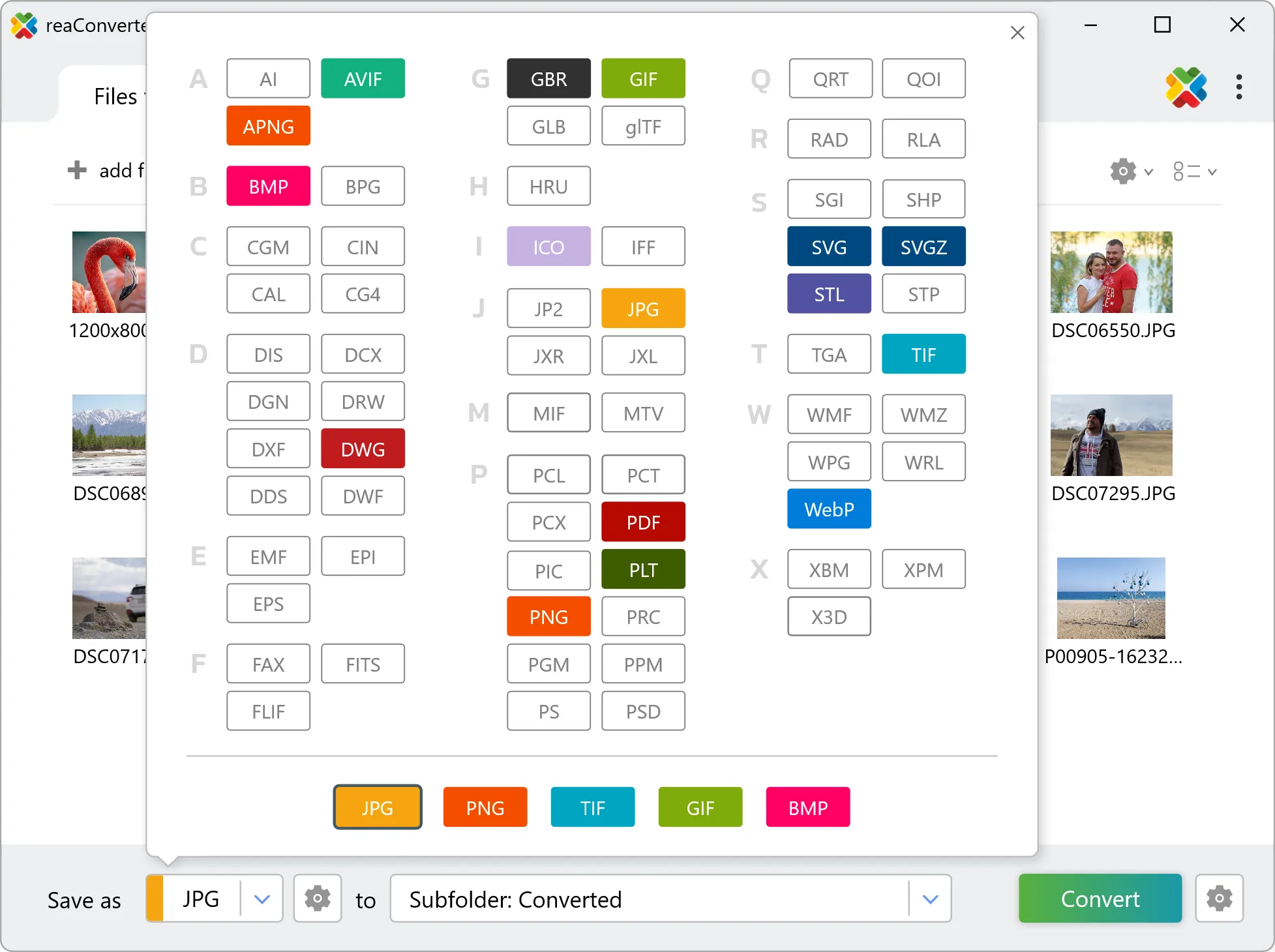
Select OBJ as output format

4. Start MEF to OBJ conversion

Hit Convert to process your files. The log window shows progress, timing, and status for every file.

Start Conversion

Conversion complete? Your OBJ files are saved to the destination folder, ready to use.

Step by step

How It Works

reaConverter offers the fastest, simplest solution for converting your MEF files into OBJ in seconds - all photos processed on your PC for maximum privacy and speed.

Power Features

Do more with your images

Converting MEF images for use in a larger project? With reaConverter, you can convert, edit, and enhance your images in one streamlined process.

Our range of editing options includes such image processing actions as Resize, Rotate, Crop, Color Replace, Watermarks and more. Adjust actions include RGB, HLS, HSV, Brightness and Contrast. Auto-processing options are also available, such as auto-rotate and auto-crop.

Image editing

User reviews

What people say after the first batch

Average User Rating:4.8
Last updated on October 14, 2026
An ultra-fast solution for minimizing file sizes. The entire conversion process takes just 3 minutes!
Logan B.
Logan B.
Satisfied Customer
I use the online converter — it’s quick and hassle-free!
Jian Wong
Jian Wong
Happy Online User
Working in a print studio means constantly juggling obscure file formats. I used to waste hours Googling converters or installing random software — until reaConverter became my Swiss Army knife. Install it once, and you're set forever. No internet? No problem!
Helen Evans
Helen Evans
Satisfied Customer
An excellent program! I use it regularly in my work - it supports nearly every file format imaginable. The interface is intuitive and runs flawlessly every time.
Roger Cook
Roger Cook
Happy User
For agencies handling confidential data, reaConverter eliminates cloud-upload risks while delivering unmatched conversion reliability. Our team uses it both in-office and remotely with identical results.
Jamal Bailey
Jamal Bailey
Satisfied Customer
Our volunteer team uses reaConverter to prepare images for fundraising campaigns. The learning curve was minimal, and the results are professional-grade. The customer support team even helped us customize a workflow — fantastic service!
Jason P. Bailey
Jason P. Bailey
Non-Profit Coordinator

FAQ

MEF to OBJ Conversion

Can reaConverter convert MEF to OBJ?

Yes! reaConverter instantly converts .mef to .obj with perfect quality preservation. With its batch processing feature, you can convert multiple files at once in just a few clicks. You can even convert MEF photos directly from Windows Explorer using the right-click menu — fast and convenient.

What is reaConverter used for?

reaConverter is a software program used for converting images and other types of files from one format to another. It supports a wide range of file formats and allows users to convert multiple files at once, making it a valuable tool for graphic designers, photographers, and other professionals who work with digital images. reaConverter also includes features for resizing, cropping, and editing images, along with batch processing capabilities that help automate repetitive tasks.

Can I convert MEF to OBJ online?

If you only need to convert a few MEF files to OBJ format, feel free to try our free online free online MEF to OBJ converter — perfect for small batches with no installation needed!

How can I turn MEF files into OBJ on my computer?

The best way to change MEFs to OBJs on your PC is to install a quality piece of software, such as reaConverter. This software is extremely efficient in managing a wide range of batch files conversions, including conversion from MEF to OBJ.

How can I automate MEF to OBJ files conversion?

reaConverter supports all the most useful automation features such as right-click сonversion and Watch Folders for the most efficient automated files conversion in any software of this type.

Is there a way to convert MEF files to OBJ using the command prompt?

reaConverter provides full access to all its features via Windows command line, including a high-performance command-line mef to obj converter for batch processing.

What else can I do with reaConverter?

Convert Gerber imagesConvert RGB to CMYKConvert RAW filesConvert raster to vectorChange image bit depth

Related conversions

Other ways to convert MEF files, and other sources that convert to OBJ.

Discover More

Beyond format conversion

Batch conversion, editing, and processing across 800+ formats, from RAW and HEIC to DICOM, DWG, and PDF. Everything runs locally, with no cloud and no upload limits.

Free trial · Windows 10/11 · v8.0.259 · Files never leave your computer

reaConverter software