

PKM → PNG · Windows

Convert PKM to PNG

Fast PKM to PNG conversion for Windows. reaConverter supports 800+ formats with batch processing and built-in editing tools.

Batch PKM to PNG conversion doesn't have to be complicated. reaConverter processes entire folders with consistent quality settings. Works offline with no internet required, so you can convert anywhere, anytime.

.pkm.PNG
4.8

Converting files since 2001

Runs offline — nothing uploaded

Read what our users say →

How to Convert Multiple .pkm Images to .png?

1. Download and Install reaConverter

First, grab reaConverter from the download button below. Installation is fast, and the software runs offline — no account or signup needed. Built-in editing tools let you resize, crop, or watermark as you convert.

2. Load your PKM files

Open reaConverter and import your .pkm files. No file limits, no slowdowns. Add as many as you need.

Drag files into the window, use the Add Files button, or select entire folders.

Load your PKM files into reaConverter

3. Select PNG as output format

Select PNG as target format and pick where to save results. You can keep default settings or fine-tune the output.
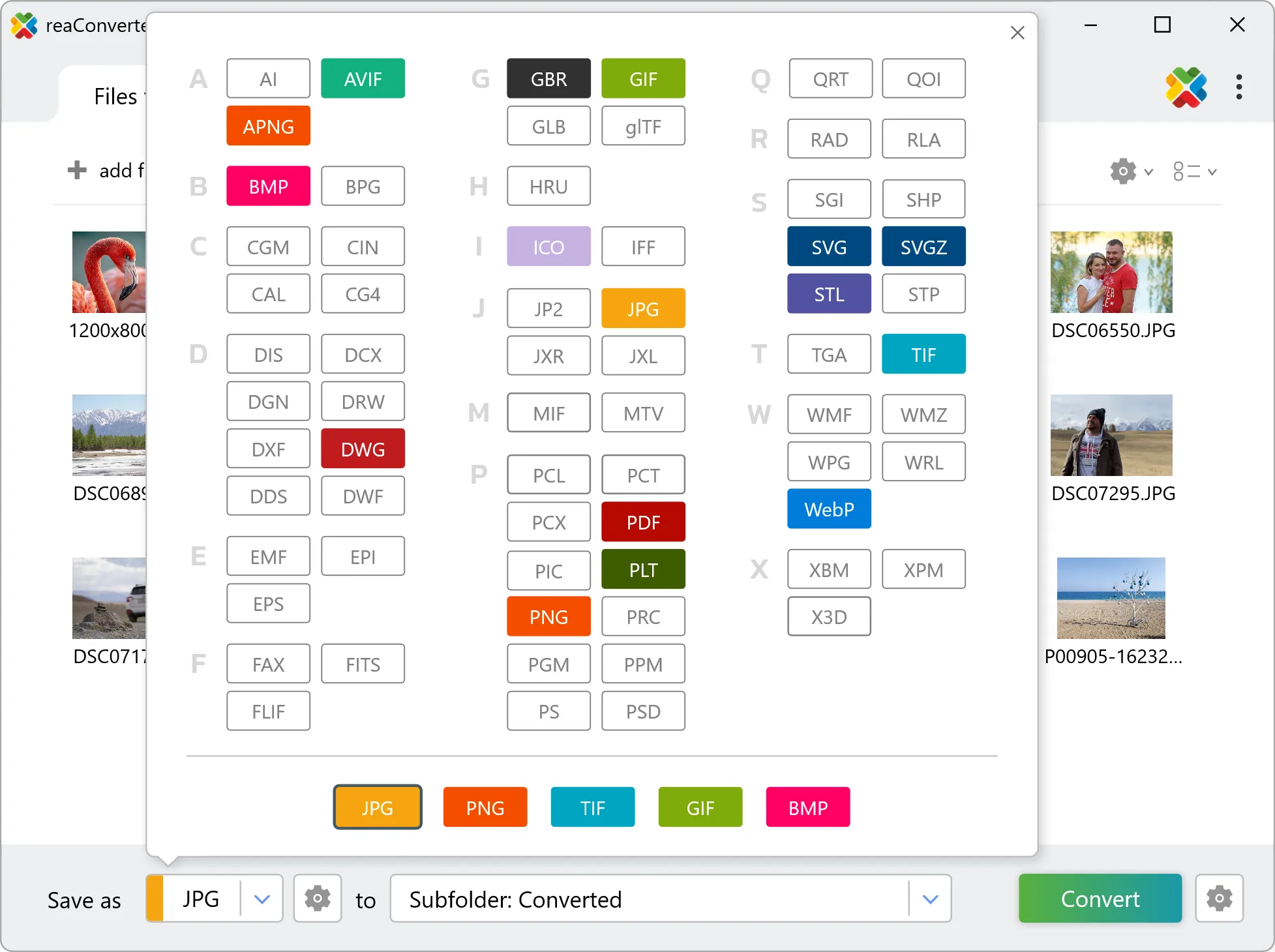
Select PNG as output format

4. Start PKM to PNG conversion

Hit Convert to process your files. The log window shows progress, timing, and status for every file.

Start Conversion

Conversion complete? Your PNG files are saved to the destination folder, ready to use.

Step by step

How It Works

reaConverter offers the fastest, simplest solution for converting your PKM files into PNG in seconds - all images processed on your PC for maximum privacy and speed.

Power Features

Do more with your images

Converting PKM images for use in a larger project? With reaConverter, you can convert, edit, and enhance your images in one streamlined process.

Our range of editing options includes such image processing actions as Resize, Rotate, Crop, Color Replace, Watermarks and more. Adjust actions include RGB, HLS, HSV, Brightness and Contrast. Auto-processing options are also available, such as auto-rotate and auto-crop.

Image editing

User reviews

What people say after the first batch

Average User Rating:4.8
Last updated on November 02, 2026
For my game development sprites, I need PNGs with perfect compression. reaConverter lets me fine-tune the color palette and compression level. It even preserves metadata. This is the only converter I trust for my asset pipeline.
Tomás García
Tomás García
Indie Game Developer
I love that reaConverter can convert PDF pages to individual PNGs. I used it to extract images from a scanned document – each page became a high-res PNG with zero loss. It's like magic, but it actually works every time.
Nancy Li
Nancy Li
Satisfied Customer
For professional-grade PNG to WebP conversions, avoid online tools with restrictive quotas. reaConverter delivers batch processing at local disk speeds – the only viable option for frequent use.
Matthew Hernandez
Matthew Hernandez
Satisfied Customer
My product photos always come out with messy backgrounds. I use reaConverter to convert them to PNG with transparency – it handles the conversion flawlessly. Then I drop them into my e‑commerce templates. Clean, professional, and so easy!
Mark Robinson
Mark Robinson
E‑commerce Owner
I had a pile of JPG screenshots that I needed to convert to PNG for a presentation. reaConverter kept every pixel intact. The interface is so straightforward – drag, drop, choose format, and go. No bloat, no ads. Just pure conversion power.
Aisha Patel
Aisha Patel
Satisfied Customer
I design logos and need transparent PNGs for clients. reaConverter converts AI and EPS files to PNG with crisp edges and full alpha channel support. The batch processing saves me hours when I have to export dozens of variants. Absolutely essential for any graphic designer.
Laura Chen
Laura Chen
Freelance Designer

FAQ

PKM to PNG Conversion

Can reaConverter convert PKM to PNG?

Yes! reaConverter instantly converts .pkm to .png with perfect quality preservation. With its batch processing feature, you can convert multiple files at once in just a few clicks. You can even convert PKM images directly from Windows Explorer using the right-click menu — fast and convenient.

What is reaConverter used for?

reaConverter is a software program used for converting images and other types of files from one format to another. It supports a wide range of file formats and allows users to convert multiple files at once, making it a valuable tool for graphic designers, photographers, and other professionals who work with digital images. reaConverter also includes features for resizing, cropping, and editing images, along with batch processing capabilities that help automate repetitive tasks.

Can I convert PKM to PNG in my browser?

Yes — with our free web-based PKM to PNG converter, you can convert .pkm files instantly, right in your browser. No installation, no uploads — perfect for quick, local conversions.

How can I turn PKM files into PNG on my computer?

The best way to change PKMs to PNGs on your PC is to install a quality piece of software, such as reaConverter. This software is extremely efficient in managing a wide range of batch files conversions, including conversion from PKM to PNG.

How can I automate PKM to PNG files conversion?

reaConverter supports all the most useful automation features such as right-click сonversion and Watch Folders for the most efficient automated files conversion in any software of this type.

Is there a way to convert PKM files to PNG using the command prompt?

reaConverter provides full access to all its features via Windows command line, including a high-performance command-line pkm to png converter for batch processing.

What else can I do with reaConverter?

Convert DICOM filesCrop photoConvert GIS filesConvert medical imagesResize image

Related conversions

Other ways to convert PKM files, and other sources that convert to PNG.

Discover More

Beyond format conversion

Batch conversion, editing, and processing across 800+ formats, from RAW and HEIC to DICOM, DWG, and PDF. Everything runs locally, with no cloud and no upload limits.

Free trial · Windows 10/11 · v8.0.262 · Files never leave your computer

reaConverter software