

QRP → CIN · Windows

Convert QRP to CIN

Convert QRP to CIN on your own machine instead of an upload form. reaConverter processes everything locally, with no size limits.

Batch QRP to CIN conversion doesn't have to be complicated. reaConverter processes entire folders with consistent quality settings. Works offline with no internet required, so you can convert anywhere, anytime.

.qrp.CIN
4.8

Converting files since 2001

Runs offline — nothing uploaded

Read what our users say →

How to Convert Multiple .qrp Files to .cin?

1. Download and Install reaConverter

reaConverter is a standalone Windows app — download, install, and start converting QRP files in under two minutes.

2. Load your QRP files

Open reaConverter and import your .qrp files. No file limits, no slowdowns. Add as many as you need.

Drag files into the window, use the Add Files button, or select entire folders.

Load your QRP files into reaConverter

3. Select CIN as output format

Select CIN as target format and pick where to save results. You can keep default settings or fine-tune the output.
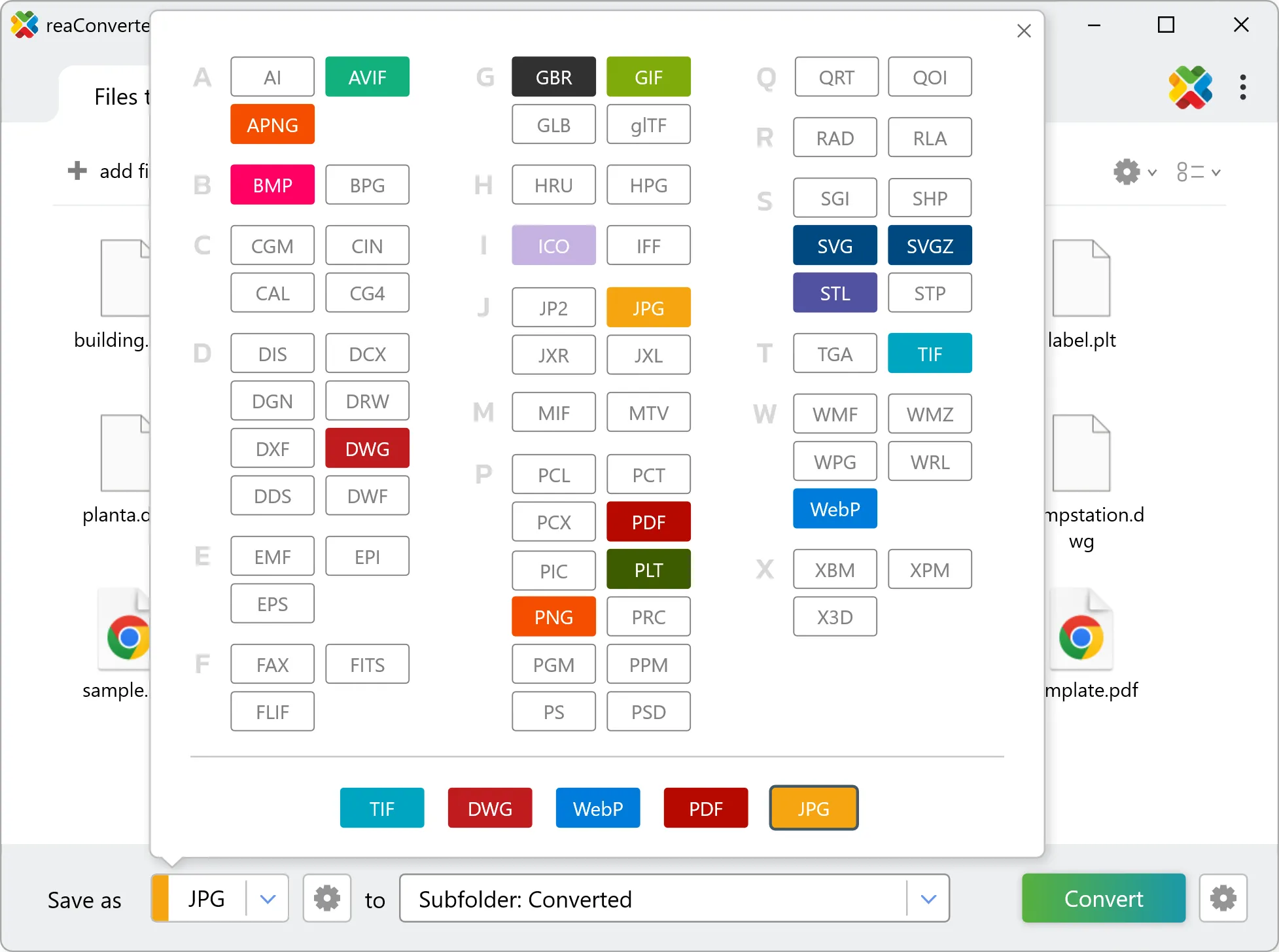
Select CIN as output format

4. Start QRP to CIN conversion

Hit Convert to process your files. The log window shows progress, timing, and status for every file.

Start Conversion

Conversion complete? Your CIN files are saved to the destination folder, ready to use.

Step by step

How It Works

reaConverter offers the fastest, simplest solution for converting your QRP files into CIN in seconds - all files processed on your PC for maximum privacy and speed.

Deep Customization

Do more with your files

Converting QRP files for use in a workflow? reaConverter offers many ways to process files, so you can customize them according to your requirements.

Our range of editing options includes auto-processing options such as auto-rotate, auto-crop, watermarking and more. Change Color Space, copy Metadata, set DPI, manage ICC Profile, control Bit Depth.

Image editing

User reviews

What people say after the first batch

Average User Rating:4.8
Last updated on November 02, 2026
An efficient all-in-one solution for image conversion and light editing, designed for maximum user-friendliness.
Elena Anderson
Elena Anderson
Happy User
Enable shell integration for lightning-fast file conversions directly from Windows Explorer.
R. Lewis
R. Lewis
Happy User
After 200+ conversions on my budget laptop (i3-1115G4/4GB RAM/Win11), reaConverter outperforms heavyweight tools. Zero crashes, low CPU usage during batch processing, and no internet dependency - exactly what professionals need.
Walter Morgan
Walter Morgan
Satisfied Customer
We deployed reaConverter across our department to standardize file formats for our archives. The command-line support and automation features integrated perfectly into our systems. Stellar performance and zero crashes—it just works.
David R.
David R.
IT Solutions Architect
So simple! I just needed to convert a couple of files to another format, and for such a straightforward task, the online converter worked perfectly — delivering the files I needed in no time. Excellent service!
Kenneth D. Carter
Kenneth D. Carter
Satisfied Customer
I run a small design agency, and reaConverter has saved me countless hours. The batch processing is lightning-fast, and the ability to convert hundreds of files into different formats at once is a game-changer. Highly recommend!
Mark T.
Mark T.
Satisfied Customer

FAQ

QRP to CIN Conversion

Can reaConverter convert QRP to CIN?

Yes! reaConverter instantly converts .qrp to .cin with perfect quality preservation. With its batch processing feature, you can convert multiple files at once in just a few clicks. You can even convert QRP files directly from Windows Explorer using the right-click menu — fast and convenient.

Can I convert QRP to CIN online?

If you only need to convert a few QRP files to CIN format, feel free to try our free online free online QRP to CIN converter — perfect for small batches with no installation needed!

How can I turn QRP files into CIN on my computer?

The best way to change QRPs to CINs on your PC is to install a quality piece of software, such as reaConverter. This software is extremely efficient in managing a wide range of batch files conversions, including conversion from QRP to CIN.

How can I automate QRP to CIN files conversion?

reaConverter supports all the most useful automation features such as right-click сonversion and Watch Folders for the most efficient automated files conversion in any software of this type.

Is there a way to convert QRP files to CIN using the command prompt?

reaConverter provides full access to all its features via Windows command line, including a high-performance command-line qrp to cin converter for batch processing.

What else can I do with reaConverter?

Convert microscopy filesResize picturesConvert PDFAdd watermark on photoConvert DICOM images

Related conversions

Other ways to convert QRP files, and other sources that convert to CIN.

Discover More

Beyond format conversion

Batch conversion, editing, and processing across 800+ formats, from RAW and HEIC to DICOM, DWG, and PDF. Everything runs locally, with no cloud and no upload limits.

Free trial · Windows 10/11 · v8.0.262 · Files never leave your computer

reaConverter software