LFF → OBJ · Windows

Convert LFF to OBJ

LFF to OBJ with consistent quality. reaConverter handles 3D files in batch, which helps when teams run different software.

Got a folder full of LFF files? reaConverter batch converts them to OBJ in minutes, not hours. Local processing means instant results, even with thousands of files. 3D artists rely on it when clients need different file formats.

Convert
4.8

Converting files since 2001

Runs offline — nothing uploaded

Read what our users say →

How to Convert Multiple .lff Files to .obj?

1. Download and Install reaConverter

reaConverter installs quickly on any Windows PC. No dependencies, no bloatware — just a clean setup that's ready to use immediately.

2. Load your LFF files

Add your LFF files to reaConverter. Whether it's a handful or an entire archive, the batch engine processes them efficiently.

Browse for files, drag them in, or add entire folders at once. reaConverter queues everything automatically.

Load your LFF files into reaConverter

3. Select OBJ as output format

Pick OBJ as the output format. Set the destination folder and optionally configure resolution, quality, or file naming.
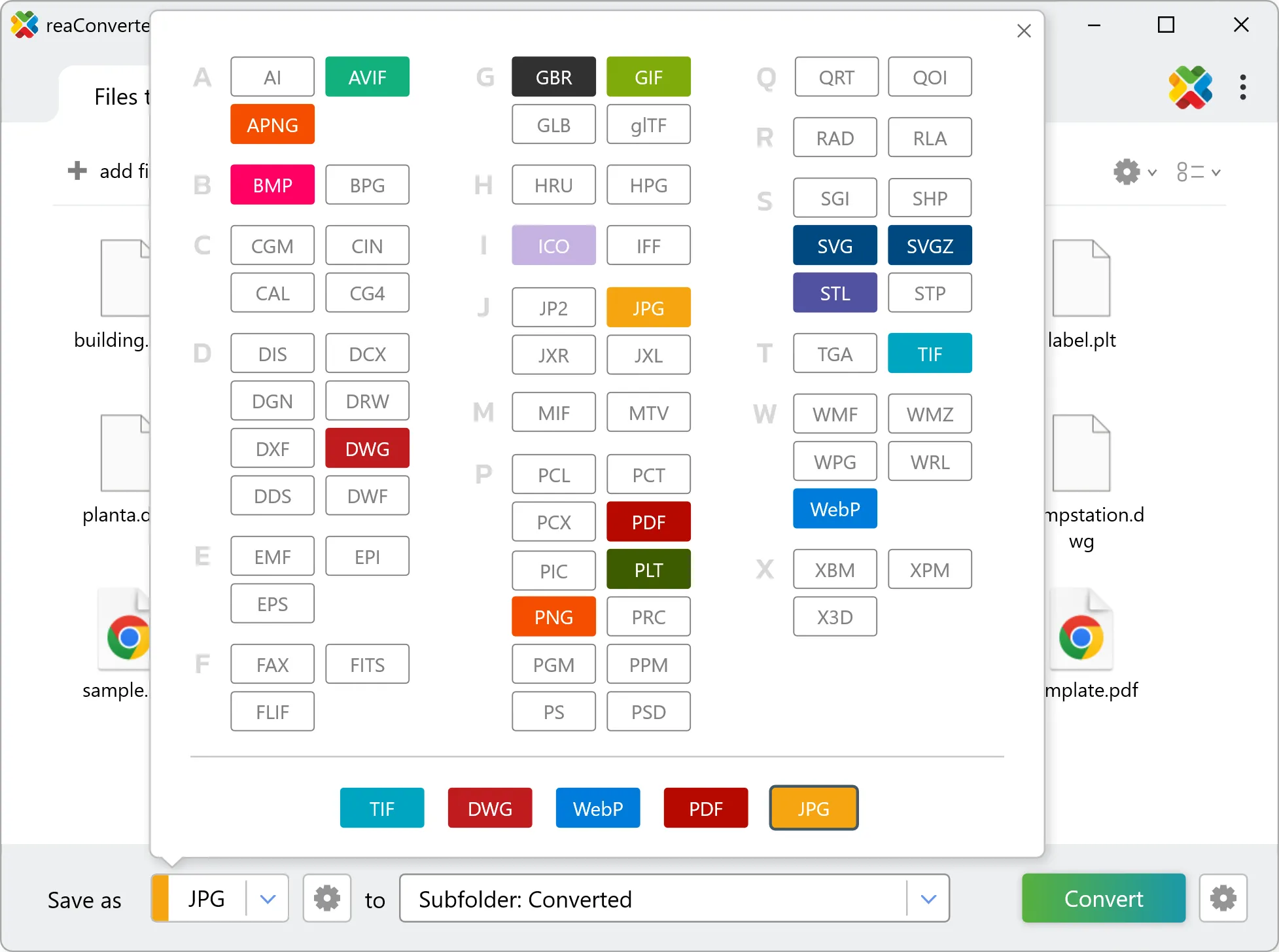
Select OBJ as output format

4. Start LFF to OBJ conversion

Start the conversion with one click. reaConverter handles everything and notifies you when it's done.

Start Conversion

When the batch finishes, your OBJ files are ready in the destination folder you chose earlier.

Step by step

How It Works

reaConverter offers the fastest, simplest solution for converting your LFF files into OBJ in seconds - all files processed on your PC for maximum privacy and speed.

Deep Customization

Do more with your files

Converting LFF files for use in a workflow? reaConverter offers many ways to process files, so you can customize them according to your requirements.

Our range of editing options includes auto-processing options such as auto-rotate, auto-crop, watermarking and more. Change Color Space, copy Metadata, set DPI, manage ICC Profile, control Bit Depth.

Image editing

User reviews

What people say after the first batch

Average User Rating:4.8
Last updated on October 12, 2026
An ultra-fast solution for minimizing file sizes. The entire conversion process takes just 3 minutes!
Logan B.
Logan B.
Satisfied Customer
I use the online converter — it’s quick and hassle-free!
Jian Wong
Jian Wong
Happy Online User
Working in a print studio means constantly juggling obscure file formats. I used to waste hours Googling converters or installing random software — until reaConverter became my Swiss Army knife. Install it once, and you're set forever. No internet? No problem!
Helen Evans
Helen Evans
Satisfied Customer
We deployed reaConverter across our department to standardize file formats for our archives. The command-line support and automation features integrated perfectly into our systems. Stellar performance and zero crashes—it just works.
David R.
David R.
IT Solutions Architect
So simple! I just needed to convert a couple of files to another format, and for such a straightforward task, the online converter worked perfectly — delivering the files I needed in no time. Excellent service!
Kenneth D. Carter
Kenneth D. Carter
Satisfied Customer
I run a small design agency, and reaConverter has saved me countless hours. The batch processing is lightning-fast, and the ability to convert hundreds of files into different formats at once is a game-changer. Highly recommend!
Mark T.
Mark T.
Satisfied Customer

FAQ

LFF to OBJ Conversion

Can reaConverter convert LFF to OBJ?

Yes! reaConverter instantly converts .lff to .obj with perfect quality preservation. With its batch processing feature, you can convert multiple files at once in just a few clicks. You can even convert LFF files directly from Windows Explorer using the right-click menu — fast and convenient.

Can I convert LFF to OBJ online?

If you only need to convert a few LFF files to OBJ format, feel free to try our free online free online LFF to OBJ converter — perfect for small batches with no installation needed!

How can I turn LFF files into OBJ on my computer?

The best way to change LFFs to OBJs on your PC is to install a quality piece of software, such as reaConverter. This software is extremely efficient in managing a wide range of batch files conversions, including conversion from LFF to OBJ.

How can I automate LFF to OBJ files conversion?

reaConverter supports all the most useful automation features such as right-click сonversion and Watch Folders for the most efficient automated files conversion in any software of this type.

Is there a way to convert LFF files to OBJ using the command prompt?

reaConverter provides full access to all its features via Windows command line, including a high-performance command-line lff to obj converter for batch processing.

What else can I do with reaConverter?

Convert Gerber imagesChange image color spaceConvert PDFWatermark imagesConvert microscopy files

Related conversions

Other ways to convert LFF files, and other sources that convert to OBJ.

Discover More

Beyond format conversion

Batch conversion, editing, and processing across 800+ formats, from RAW and HEIC to DICOM, DWG, and PDF. Everything runs locally, with no cloud and no upload limits.

Free trial · Windows 10/11 · v8.0.259 · Files never leave your computer

reaConverter software